How to leave instructions for a house sitter
You know your house by heart: the thermostat that needs a tap to wake up, the scoop that lives in the bottom drawer, the alarm code with a 30-second window. Your sitter knows none of it. Most house sitter instructions try to close that gap with pages of written notes — and most sitters end up texting anyway, because "the switch by the pantry" means nothing to someone who has never stood in your kitchen.
The fix isn't writing more. It's showing. A photo of the actual switch, with your voice saying what to do with it, answers the question before it gets asked.
What your sitter actually needs to know
Walk the house in your head as if you were arriving for the first time. The list almost always comes down to:
- Getting in: which door, where the key or lockbox is, the code, and the alarm — including how long they have to disarm it.
- Pets: what to feed, how much, when, and where the food actually is. Add the vet's number and any quirks ("she hides when the doorbell rings").
- The house's routines: trash and recycling day, plants that need water, mail, lights that should be on at night.
- Things with a trick to them: the thermostat, the TV remote, the shower that runs cold for a minute, the door that needs a lift to lock.
- When something goes wrong: where the breaker box and water shutoff are, and who to call — you, a neighbor, a plumber.
Show it, don't write it: the five-minute walkthrough
- Open Facilist and start a new list for the trip.
- Walk to the first thing your sitter will touch — the lockbox, the alarm keypad — take a photo, and say what they need to know, the way you would if they were standing next to you.
- Do the same for the thermostat, the pet food, the trash cans, the plants, and anything in the house with a quirk.
- Each recording is transcribed automatically, so every photo carries your words in text and your voice for the full explanation.
- Send the finished list as a single link. Your sitter opens it in any browser — no app, no account.
Here’s a real example — tap play on any item to hear it:
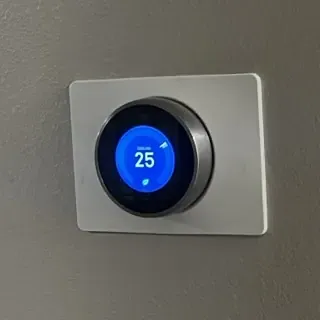
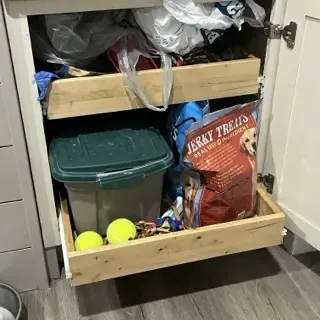
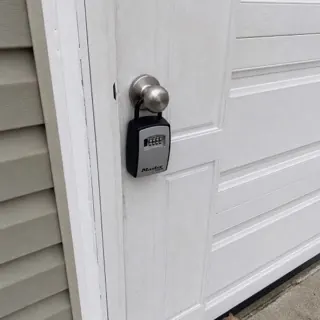
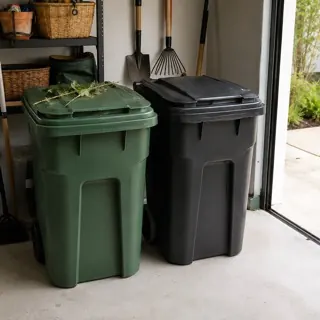
How to leave a list for a pet sitter
Pet care is where written notes fail hardest, because so much of it is where and how much: the right drawer, the right scoop, the right leash. Photograph the food where it lives and say the amount out loud — "one scoop, morning and night, green tub, bottom drawer" — and there's nothing left to misread. Add an item for the leash and the usual walk, one for where she sleeps, and one with the vet's name and number. Your pet sitter can replay your voice standing in front of the drawer, which beats scrolling back through a text thread with a dog waiting.
What about door codes and alarm codes?
Codes are the reason people hesitate to put instructions anywhere. Your lists aren’t publicly listed: each has its own unguessable link, it is never searchable, and search engines are told not to index it. Anyone with your shared link can view the list, so share it only with people you trust — an unguessable link keeps strangers from finding it, but it doesn’t stop someone forwarding it. When the trip is over you can stop sharing anytime; the link immediately stops working. More detail is in the FAQ and the Privacy Policy.